

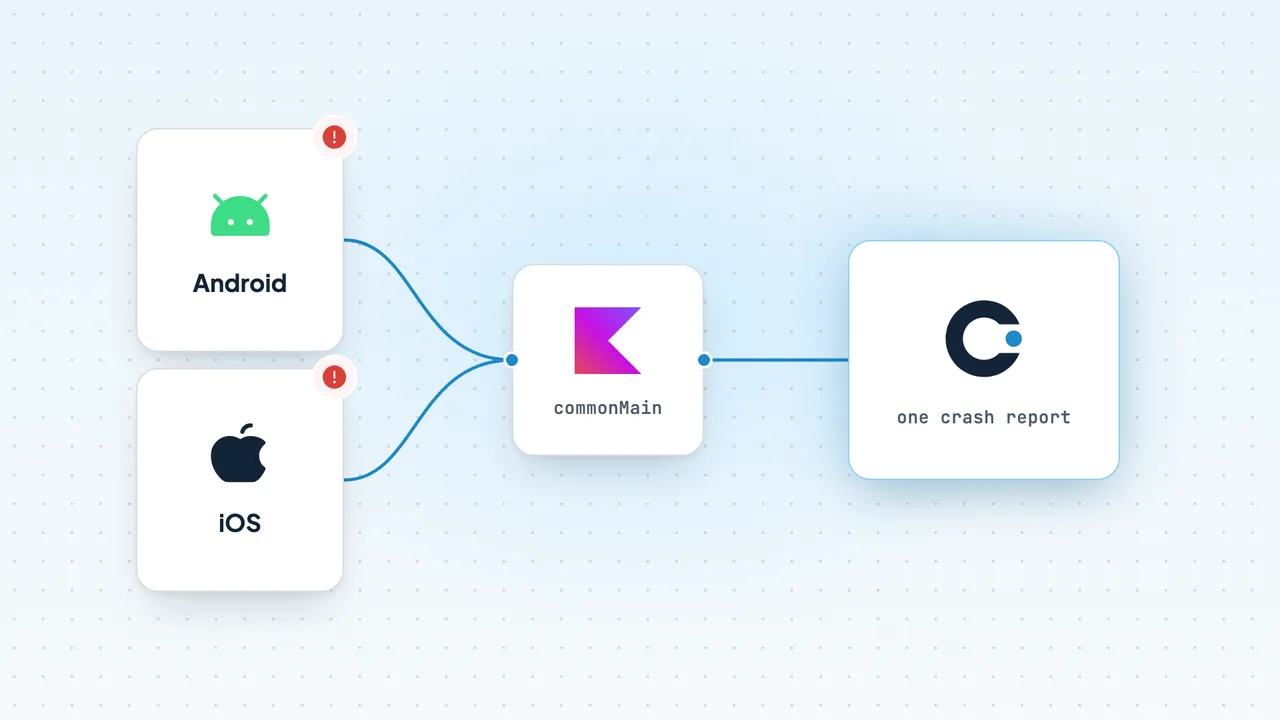
On Android, a Kotlin Multiplatform app crashes like any other Android app, and any Android crash reporter sees the full Kotlin stack trace. On iOS it is harder. A Kotlin exception that escapes into Swift or Objective-C terminates the app, and an iOS crash reporter records the stack at the moment of termination. That stack points at the Swift call into Kotlin, not at the line that threw. To get useful reports you need three things. Mark functions Swift calls with @Throws, so expected errors become Swift errors. Install a Kotlin unhandled-exception hook that hands the real Kotlin stack trace to your crash reporter. Keep the dSYM files for your Kotlin framework. CrashKiOS does the hook work for Crashlytics and Bugsnag, and Sentry's and Bugsnag's KMP SDKs do it for their own back ends.
This guide explains the mechanics, compares the options fairly, and covers where Codeskop's KMP SDK fits. It is an early access beta. If you're building the Android side, Android ANRs: causes, detection and fixes and OkHttp interceptors for network monitoring apply directly. The Codeskop KMP & iOS docs cover the beta setup.
Why KMP crash reporting is hard on iOS
Kotlin exceptions are unchecked; Swift errors are checked
Kotlin has no checked exceptions, while Swift only has checked errors. The Kotlin/Native interop docs spell out what happens at the boundary:
- A Kotlin function marked
@Throws(SomeException::class)becomes anNSError*-producing method in Objective-C and athrowsmethod in Swift. If it throwsSomeExceptionor a subclass, Swift receives anNSError. - "Other Kotlin exceptions reaching Swift/Objective-C are considered unhandled and cause program termination."
- Non-
suspendfunctions without@Throwsdon't propagate Kotlin exceptions at all.suspendfunctions without@Throwspropagate onlyCancellationException.
So this shared-code function crashes an iOS app if the server returns bad JSON:
// commonMainclass CartRepository(private val api: CartApi) { suspend fun loadCart(): Cart = api.fetchCart() // throws SerializationException on malformed JSON}Annotating it lets Swift handle the failure:
// commonMainclass CartRepository(private val api: CartApi) { @Throws(SerializationException::class, CancellationException::class) suspend fun loadCart(): Cart = api.fetchCart()}do { let cart = try await repository.loadCart() show(cart)} catch { showError(error) // an NSError wrapping the Kotlin exception}@Throws is the right fix for expected errors. It does nothing for bugs you didn't anticipate, such as a NullPointerException deep in shared code. Those still terminate the app.
The crash report points at the wrong place
When an unhandled Kotlin exception terminates an iOS app, iOS crash reporters capture the threads at the moment of termination. Touchlab's CrashKiOS docs describe the result: "the crash report shows the point at which we call into Kotlin from Swift/Objc." Kotlin's own stack trace, the frames between the throw and the boundary, is gone unless something captured it before termination.
The unhandled exception hook
Kotlin/Native gives you a hook that runs before termination. These APIs live in kotlin.native and are marked @ExperimentalNativeApi:
setUnhandledExceptionHook(hook)runs "whenever there is an uncaught exception reaching the boundaries of the Kotlin world", including an Objective-C-to-Kotlin call not marked@Throws. It returns the previous hook, so you can chain.terminateWithUnhandledException(throwable)terminates the program the same way the default behaviour does, without calling hooks. The runtime source recommends it for hooks that terminate the app.processUnhandledException(throwable)calls your hook if one is set; otherwise it terminates.
A minimal hook looks like this:
// iosMain@OptIn(ExperimentalNativeApi::class)fun installCrashHook(report: (Throwable) -> Unit) { val previous = setUnhandledExceptionHook { throwable -> report(throwable) // capture the Kotlin stack trace now previous?.invoke(throwable) terminateWithUnhandledException(throwable) }}The hard part is report. It has to persist the Kotlin stack trace in a form your crash reporter can show and symbolicate, before the process dies. That is what the libraries below do.
Symbolication and dSYMs
Kotlin frames in an iOS crash report are memory addresses until they're symbolicated. Per the Kotlin/Native debugging docs, the compiler "generates .dSYM files for release (optimized) binaries on Apple platforms by default", and Xcode picks them up from the standard locations. Your crash tool needs the dSYM that matches each build. With a dynamic framework, the Kotlin framework's .dSYM may need uploading separately; CrashKiOS documents the "Missing UUID" error you get otherwise.
On Android, the equivalent is the R8 mapping.txt for each release.
Kotlin Multiplatform and iOS, in early access beta
Report crashes from shared Kotlin code and your iOS app with one SDK. It's an early access beta.
The options in the ecosystem
| Tool | What it is | iOS Kotlin exceptions | Status (checked October 2026) |
|---|---|---|---|
| CrashKiOS + Kermit | Touchlab's open-source bridge to Firebase Crashlytics or Bugsnag | Installs a hook (setCrashlyticsUnhandledExceptionHook()) and reports Kotlin crashes with symbolicated Kotlin frames | CrashKiOS 0.10.0 (Sept 2026); Kermit 2.2.0 |
| Firebase Crashlytics | Google's crash reporter, official SDKs for Android and iOS | Via CrashKiOS; no official KMP SDK | Crashlytics GA; KMP via community libraries |
| Sentry KMP SDK | Official Sentry SDK wrapping sentry-android and sentry-cocoa | Sets its own unhandled-exception hook on start and reports Kotlin crashes as fatal | Pre-1.0: 0.27.0 stable, 0.28.0 in beta |
| Bugsnag KMP | Official Bugsnag SDK for Android, iOS and web | Uses bugsnag-cocoa underneath | 1.0.0 (Sept 2025) |
| Codeskop KMP SDK | Shared Kotlin core with Android runtime and a Swift package | Captures uncaught exceptions and crash signals on iOS | Early access beta |
CrashKiOS and Kermit (Crashlytics or Bugsnag)
CrashKiOS is a "thin library that provides symbolicated crash reports for Kotlin code on iOS". It supports crashes, handled exceptions, breadcrumbs and custom keys, sending to Firebase Crashlytics or Bugsnag. For Crashlytics you add co.touchlab.crashkios:crashlytics, call enableCrashlytics(), and in iOS startup code call setCrashlyticsUnhandledExceptionHook(). There are two documented gotchas. You need to disable the Kotlin/Native compiler cache for simulator targets (kotlin.native.cacheKind.iosSimulatorArm64=none). Dynamic frameworks need the co.touchlab.crashkios.crashlyticslink Gradle plugin. Kermit, Touchlab's logging library, adds CrashlyticsLogWriter and BugsnagLogWriter so log lines become breadcrumbs.
Good fit if you already use Crashlytics (it's free; see our Crashlytics comparison) or Bugsnag and want proper Kotlin stack traces on iOS. Note that Google ships no official KMP SDK; the community GitLive Firebase Kotlin SDK wraps the official SDKs for other Firebase APIs.
Sentry's KMP SDK
Sentry's SDK wraps its Android and Cocoa SDKs for Android, JVM, iOS, macOS, watchOS and tvOS. JS, Wasm, Linux and Windows targets compile but do nothing at runtime. You initialise with Sentry.init { options -> options.dsn = "..." } from shared code, and on iOS it installs an unhandled-exception hook automatically. Each KMP release is pinned to a specific sentry-cocoa version, so check the compatibility table when upgrading. dSYM upload follows Sentry's iOS docs. Sentry is also the broadest option, with tracing, profiling and session replay on its native SDKs (see Sentry vs Codeskop).
Bugsnag's KMP SDK
Bugsnag reached 1.0.0 for KMP in September 2025, covering Android, iOS and web. You add com.bugsnag:bugsnag-kmp and the bugsnag-cocoa package for iOS, then call Bugsnag.start(configuration).
Where Codeskop fits (early access beta)
Codeskop's Kotlin Multiplatform and iOS support is an early access beta. The core is the same Kotlin SDK that powers our generally available Android and Flutter releases, but the setup and API may change before general availability. Here is what the beta covers, per the KMP docs:
- Shared code (
commonMain):identify,reset,recordException,setEnabledandflush. - Android target: everything in the Android SDK: crashes, ANRs and OkHttp network capture.
- iOS (14 or later): uncaught exceptions and crash signals are captured automatically once the SDK starts, with the same on-device queue as Android, so reports survive being offline.
- Not in the beta yet: there's no Ktor client plugin, so network capture from shared code isn't automatic, and URLSession requests on iOS aren't captured automatically. Beta teams get a reference
URLProtocolsubclass (under 100 lines) that forwards failures toCodeskop.shared.captureApiError(call:).
Setup in the shared module:
kotlin { sourceSets { commonMain.dependencies { implementation("com.codeskop.sdk:tracker-core:0.3.0") } androidMain.dependencies { implementation("com.codeskop.sdk:tracker-android:0.3.0") implementation("com.codeskop.sdk:tracker-okhttp:0.3.0") // optional network capture } }}Initialise on Android, then report from shared code:
// androidMain: initialize once, e.g. in Application.onCreateCodeskopAndroid.init( context, CodeskopConfig(apiKey = BuildConfig.CODESKOP_KEY),)// commonMain: identify and report from shared codeCodeskop.identify(userId = user.id) try { syncCart()} catch (e: Exception) { Codeskop.recordException(e)}On iOS, the SDK is a Swift package (https://github.com/Codeskop-io/mobile-sdk.git), served from a private repository during the beta. Start it once at launch:
import CodeskopSDK // Swift needs every CodeskopConfig parameter spelled outlet config = CodeskopConfig( apiKey: "cs_live_pk_xxx", endpoint: "https://api.codeskop.com", environment: "production", sampleRates: [:], captureNetwork: true, captureHeaders: true, captureBodies: false, redactHeaders: ["authorization", "cookie", "set-cookie"], redactQueryKeys: ["token", "apikey", "password", "secret"], maxQueueMb: 10, heartbeatEnabled: true, flushBatchSize: 50)CodeskopIos.shared.start(config: config) // At loginCodeskop.shared.identify(userId: user.id, traits: [:])Every parameter is spelled out because Kotlin default values don't carry over to the generated Swift initialiser.
Who it suits today: teams that want one tool across a KMP app's Android and iOS sides, plus web and React, with crash and network failures in one place and public pricing (Free: 10,000 events/month; paid from $49/month as of October 2026, see pricing). Paid plans are billed in USD by card, and teams in Kenya can pay with M-Pesa GlobalPay's virtual Visa card. If you need production-grade iOS crash reporting today, with dSYM-symbolicated Kotlin frames and years of hardening, the established options above are the safer choice, and you can revisit Codeskop at general availability.
A checklist for KMP crash reporting
- Add
@Throwsto every shared function Swift calls that can fail for expected reasons (network, parsing, validation), includingCancellationExceptionforsuspendfunctions. - Install an unhandled-exception hook on iOS, yourself or through your SDK, and chain to the previous hook.
- Archive the Kotlin framework's dSYM for every iOS build, and
mapping.txtfor every Android release. - Test a deliberate crash from shared code on a real iOS device in a release build, and check that the report shows the Kotlin line.
- Report handled exceptions from
commonMain, so failures you recover from still show up.
Frequently asked questions
Why does my KMP iOS crash report point at Swift code?
iOS crash reporters capture the stack when the app terminates. An unhandled Kotlin exception has already unwound to the Swift/Objective-C boundary by then. Use a Kotlin unhandled-exception hook (via CrashKiOS, Sentry or Bugsnag) to capture the Kotlin stack trace first.
What does @Throws do in Kotlin Multiplatform?
It makes the function a throwing method in Swift (NSError* in Objective-C). Listed exception types, and their subclasses, reach Swift as errors you can catch. Other Kotlin exceptions still terminate the app.
Does Firebase Crashlytics support Kotlin Multiplatform?
Not officially. Crashlytics has official Android and iOS SDKs, and Touchlab's CrashKiOS connects KMP code to them with proper Kotlin stack traces on iOS.
Is Codeskop's KMP SDK production-ready?
It's an early access beta. Android behaves like our generally available Android SDK. iOS captures uncaught exceptions and crash signals, but the API may change before general availability.
Do Kotlin/Native release builds produce dSYMs?
Yes. Kotlin/Native generates .dSYM files for release binaries on Apple platforms by default. Upload them to your crash tool for each build.